Parallelisation with Numpy and Numba
Overview
Teaching: 50 min
Exercises: 30 minQuestions
How can we measure the performance of our code?
How can we improve performance by using Numpy array operations instead of loops?
How can we improve performance by using Numba?
Objectives
Apply profiling to measure the performance of code.
Understand the benefits of using Numpy array operations instead of loops.
Remember that single instruction, multiple data instrcutions can speed up certain operations that have been optimised for their use.
Understand that Numba is using Just-in-time compilation and vectorisation extensions.
Understand when to use ufuncs to write functions that are compatible with Numba.
This episode is based in material from Ed Bennett’s Performant Numpy lesson
Measuring Code Performance
There are several ways to measure the performance of your code.
Timeit
We can get a reasonable picture of the performance of individual functions and code snippets
by using the timeit module. timeit will run the code multiple times and take an average runtime.
In Jupyter, timeit is provided by line and cell magics. A magic is some special extra helper features added to Python.
The line magic:
%timeit result = some_function(argument1, argument2)
will report the time taken to perform the operation on the same line
as the %timeit magic. Meanwhile, the cell magic
%%timeit

intermediate_data = some_function(argument1, argument2)
final_result = some_other_function(intermediate_data, argument3)
will measure and report timing for the entire cell.
Since timings are rarely perfectly reproducible, timeit runs the
command multiple times, calculates an average timing per iteration,
and then repeats to get a best-of-N measurement. The longer the
function takes, the smaller the relative uncertainty is deemed to be,
and so the fewer repeats are performed. timeit will tell you how
many times it ran the function, in addition to the timings.
You can also use timeit at the command-line; for example,
$ python -m timeit --setup='import numpy; x = numpy.arange(1000)' 'x ** 2'
Notice the --setup argument, since you don’t usually want to time
how long it takes to import a library, only the operations that you’re
going to be doing a lot.
Time
There is another magic we can use that is simply called time. This works very similarly to timeit but will only run the code once instead of multiple times.
Profiling
You can also explore profiling to measure the performance of our Python code. Profiling provides detailed information about how much time is spent on each function, which can help us identify bottlenecks and optimize our code.
In Python, we can use the cProfile module to profile our code. Let’s
see how we can do this by creating two functions:
import numpy as np

# A slow function
def my_slow_function():
  data = np.arange(1000000)
  total = 0
  for i in data:
      total += i
  return total

# A fast function using numpy
def my_fast_function():
  return np.sum(np.arange(1000000))
Now run each function using the cProfile command:
import cProfile
cProfile.run("my_slow_function()")
cProfile.run("my_fast_function()")
This will output detailed profiling information for both functions. It will show how long was taken by each function and the functions that they called. You can use this information to analyze the performance of your code and optimize it as needed.
         5 function calls in 0.069 seconds

   Ordered by: standard name

   ncalls  tottime  percall  cumtime  percall filename:lineno(function)
        1    0.063    0.063    0.069    0.069 2712269264.py:4(my_slow_function)
        1    0.000    0.000    0.069    0.069 <string>:1(<module>)
        1    0.000    0.000    0.069    0.069 {built-in method builtins.exec}
        1    0.006    0.006    0.006    0.006 {built-in method numpy.arange}
        1    0.000    0.000    0.000    0.000 {method 'disable' of '_lsprof.Profiler' objects}


         12 function calls in 0.004 seconds

   Ordered by: standard name

   ncalls  tottime  percall  cumtime  percall filename:lineno(function)
        1    0.000    0.000    0.004    0.004 2712269264.py:12(my_fast_function)
        1    0.000    0.000    0.004    0.004 <string>:1(<module>)
        1    0.000    0.000    0.000    0.000 fromnumeric.py:2299(_sum_dispatcher)
        1    0.000    0.000    0.002    0.002 fromnumeric.py:2304(sum)
        1    0.000    0.000    0.002    0.002 fromnumeric.py:66(_wrapreduction)
        1    0.000    0.000    0.000    0.000 fromnumeric.py:67(<dictcomp>)
        1    0.000    0.000    0.004    0.004 {built-in method builtins.exec}
        1    0.000    0.000    0.000    0.000 {built-in method builtins.isinstance}
        1    0.003    0.003    0.003    0.003 {built-in method numpy.arange}
        1    0.000    0.000    0.000    0.000 {method 'disable' of '_lsprof.Profiler' objects}
        1    0.000    0.000    0.000    0.000 {method 'items' of 'dict' objects}
        1    0.002    0.002    0.002    0.002 {method 'reduce' of 'numpy.ufunc' objects}
You will see that Numpy is about 17 times faster than the loop in this example.
Exercise: Why is Numpy faster?
Do you know why the fast function is faster than the slow function? Discuss in the group or with your neighbour reasons what could make Numpy faster.
Solution
The reason why the Numpy operation is faster than the traditional loop-based approach is because:
- Vectorization: Numpy operations are vectorized, meaning they are applied element-wise to the entire array at once. This allows for efficient parallelization and takes advantage of optimized low-level implementations.
- Avoiding Python overhead: Traditional loops in Python incur significant overhead due to Python’s dynamic typing and interpretation. Numpy operations are implemented in C, bypassing much of this overhead.
- Optimized algorithms: Numpy operations often use highly optimized algorithms and data structures, further enhancing performance.
Numpy whole array operations
Numpy whole array operations refer to performing operations on entire arrays at once, rather than looping through individual elements.
Callout: How do Vectorised Operations Work
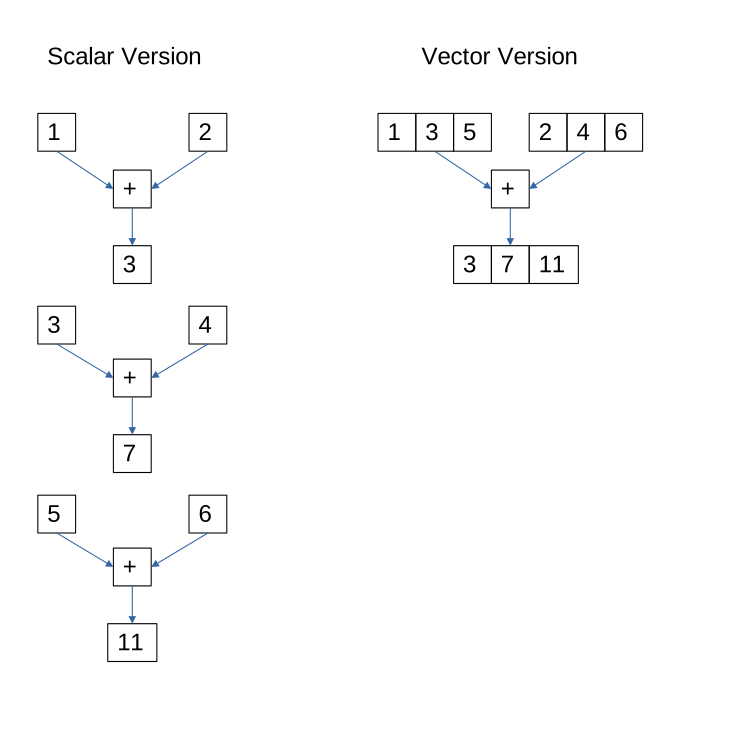
Older CPUs (prior to the mid 1990s) could only perform scalar mathematical operations, adding, subtracing, multiplying or dividing a single pair of numbers in each instruction. If we wanted to add (or subtract, multiply or divide) the corresponding elements in two arrays then we would need to use a loop and run an instruction for each pair from the two arrays. This could be made faster by running the CPU’s clock at a higher frequency. Between 1980 to 2000 clock speeds leapt from a few MHz to 1 GHz, yielding 100s-1000 fold speed increases. Subsequently clock speeds have only increased by a factor of about three or four to 3-4 GHz as we have neared the limits of how fast silicon can be switched.
To work around this CPUs have implemented vector operations where a single instruction can be used to add (subtract, multiply or divide) several numbers from two arrays. This requires more transistors on the CPU to implement several parallel units to perform multiple operations, but CPU manufacturers have (or at least had) successfully increased the number of transistors on a CPU by making each one smaller far better than they had increased clock speeds. The size array that these vector units can work on has grown over time from 64 bits in the late 1990s to up to 512 bits by 2016. More vector operations have also been introduced in that time, so it isn’t just basic arithmetic but also min/max, square roots, dot products, string processing and floating point operations.
The diagram below compares a traditional scalar addition with a vector addition.
This approach leverages the optimized C and Fortran implementations underlying NumPy, leading to significantly faster computations compared to traditional Python loops.
Let’s illustrate this with an example that calculates the distance between two points on the earth’s surface using the great circle method:
import numpy as np
import cProfile
import math as m

def distance(lon1, lat1, lon2, lat2):
    r_earth = 6371.0 # km
    lat1 = m.radians(lat1)
    lat2 = m.radians(lat2)
    dlat = lat2 - lat1
    dlon = m.radians(lon2 - lon1)

    a = m.sin(dlat/2.0)**2 + m.cos(lat1) * m.cos(lat2) * m.sin(dlon/2.0)**2
    c = 2.0 * m.atan2(m.sqrt(a), m.sqrt(1-a))

    return c * r_earth
Let’s test that between a point in London and one in New York. We place these into tuples to pair the latitude and longitudes. The * notation converts the tuples back into pairs of arguments for the function.
new_york = (-74.0061, 40.7182)
london = (-0.1275, 51.507222)
print(distance(*london, *new_york))
Now let’s try to use this function with an array of 1000 randomly generated points. We’ll need the latitudes to be between -90 and +90 and the longitudes to be between -180 and +180.
lats_1 = 180.0 * np.random.random(1000) - 90.0
lats_2 = 180.0 * np.random.random(1000) - 90.0
lons_1 = 360.0 * np.random.random(1000) - 180.0
lons_2 = 360.0 * np.random.random(1000) - 180.0
distance(lons_1, lats_1, lons_2, lats_2)
This fails to work because the math. trigometric functions only work with a scalar (single) value, not a whole array.
Let’s change it to use the NumPy versions of these functions which can take list inputs.
def distance_np(lon1, lat1, lon2, lat2):
    r_earth = 6371.0 # km
    lat1 = np.radians(lat1)
    lat2 = np.radians(lat2)
    dlat = lat2 - lat1
    dlon = np.radians(lon2 - lon1)

    a = np.sin(dlat/2.0)**2 + np.cos(lat1) * np.cos(lat2) * np.sin(dlon/2.0)**2
    c = 2.0 * np.atan2(np.sqrt(a), np.sqrt(1-a))

    return c * r_earth
We can now process all of these elements in one call. The output for this will be a 1000 element array that we probably don’t want to see. We can discard the output by storing it in a variable called “_”.
_ = distance_np(lons_1, lats_1, lons_2, lats_2)
Now calculate the time comparison and the profile performance of the code for processing a 1000 element array. We’ll write a for loop to process the data for the traditional version:
def loop_distance(lons1, lats1, lons2, lats2):
    for lat1, lat2, lon1, lon2 in zip(lats1, lats2, lons1, lons2):
        _ = distance(lon1, lat1, lon2, lat2)

%timeit loop_distance(lons_1, lats_1, lons_2, lats_2)
%timeit distance_np(lons_1, lats_1, lons_2, lats_2)
# Profile distance calculation functions
print("Profiling loop:")
cProfile.run("loop_distance(lons_1, lats_1, lons_2, lats_2)")
print("\nProfiling numpy:")
cProfile.run("distance_np(lons_1, lats_1, lons_2, lats_2)")
We see that the loop version is around 10 times slower than the NumPy version. From the profiler output we see far fewer function calls taking place, which is one area we are reducing overhead in.
Excercise: Compare multiplication speeds with the temperature anomaly dataset
Use the following functions to apply a correction of multiplying all temperature anomaly data in our example dataset by 1.1.
# Traditional loop-based operation
def traditional_multiply(arr):
    result = np.empty_like(arr)
    for i in range(arr.shape[0]):
        for j in range(arr.shape[1]):
            result[i, j] = arr[i, j] * 1.1
    return result
# Numpy whole array operation def numpy_multiply(arr): return arr * 1.1Load the data from the NetCDF file and apply the correction using both the
traditional_multiplyandnumpy_multiplyfunctions. Time each approach and compare how long they take. Hint: you can convert the data from the NetCDF file to a normal Python array (that will also work with Numpy) by usingdataset.variables['tempanomaly'][:][:][:].Solution
import netCDF4
dataset = netCDF4.Dataset("gistemp1200-21c.nc")
arr = dataset.variables['tempanomaly'][:][:][:]
print("Profiling traditional_multiply:")
cProfile.run("traditional_multiply(arr)")
print("\nProfiling numpy_multiply:")
cProfile.run("numpy_multiply(arr)")
Traditional multiply
Profiling traditional_multiply:
         22467237 function calls in 7.472 seconds

   Ordered by: standard name

   ncalls  tottime  percall  cumtime  percall filename:lineno(function)
        1    0.175    0.175    7.465    7.465 2181099273.py:2(traditional_multiply)
        1    0.007    0.007    7.472    7.472 <string>:1(<module>)
   155700    0.043    0.000    0.200    0.000 _methods.py:55(_any)
   155700    0.137    0.000    0.297    0.000 _ufunc_config.py:19(seterr)
  .
  .
  .
Numpy multiply
Profiling numpy_multiply:
         87 function calls in 0.300 seconds

   Ordered by: standard name

   ncalls  tottime  percall  cumtime  percall filename:lineno(function)
        1    0.000    0.000    0.293    0.293 3037342256.py:2(numpy_multiply)
        1    0.007    0.007    0.300    0.300 <string>:1(<module>)
        1    0.000    0.000    0.000    0.000 _methods.py:55(_any)
        1    0.000    0.000    0.000    0.000 _ufunc_config.py:19(seterr)
.
.
.
Numba
What is Numba and how does it work?
We know that due to various design decisions in Python, programs written using pure Python operations are slow compared to equivalent code written in a compiled language. We have seen that Numpy provides a lot of operations written in compiled languages that we can use to escape from the performance overhead of pure Python. However, sometimes we do still need to write our own routines from scratch. This is where Numba comes in. Numba provides a just-in-time compiler. If you have used languages like Java, you may be familiar with this. While Python can’t easily be compiled in the way languages like C and Fortran are, due to its flexible type system, what we can do is compile a function for a given data type once we know what type it can be given. Subsequent calls to the same function with the same type make use of the already-compiled machine code that was generated the first time. This adds significant overhead to the first run of a function since the compilation takes longer than the less optimised compilation that Python does when it runs a function; however, subsequent calls to that function are generally significantly faster. If another type is supplied later, then it can be compiled a second time.
Numba makes extensive use of a piece of Python syntax known as
“decorators”. Decorators are labels or tags placed before function
definitions and prefixed with @; they modify function definitions,
giving them some extra behaviour or properties.
Universal functions in Numba
(Adapted from the Scipy 2017 Numba tutorial)
Numpy gives us many operations that operate on whole arrays, element-wise. These are known as “universal functions”, or “ufuncs” for short. Ufuncs are an example of vectorization because they operate on the whole array in one operation, not just a single element at a time. This takes advantage of vectorization instructions in modern CPUs which conduct operations on an array in similar or even the same time a single operation would take.
Numpy has the facility for you to define your own ufuncs,
but it is quite difficult to use. Numba makes this much easier with
the @vectorize decorator. With this, you are able to write a
function that takes individual elements, and have it extend to operate
element-wise across entire arrays.
Let’s take our standard distance function and vectorise it:
from numba import vectorize

@vectorize
def distance_vec(lon1, lat1, lon2, lat2):
    r_earth = 6371.0 # km
    lat1 = m.radians(lat1)
    lat2 = m.radians(lat2)
    dlat = lat2 - lat1
    dlon = m.radians(lon2 - lon1)

    a = m.sin(dlat/2.0)**2 + m.cos(lat1) * m.cos(lat2) * m.sin(dlon/2.0)**2
    c = 2.0 * m.atan2(m.sqrt(a), m.sqrt(1-a))

    return c * r_earth
Let’s also increase the size of our test data to one million elements instead of one thousand.
lats_1 = 180.0 * np.random.random(1000_000) - 90.0
lats_2 = 180.0 * np.random.random(1000_000) - 90.0
lons_1 = 360.0 * np.random.random(1000_000) - 180.0
lons_2 = 360.0 * np.random.random(1000_000) - 180.0
Before we found this function couldn’t work with arrays directly and we had to use a for loop to make it accept an array. Now we’ve used Numba to “vectorize” this function it becomes a ufunc, and will work on Numpy arrays!
_ = distance_vec(lons_1, lats_1, lons_2, lats_2)
How does the performance compare with using the equivalent Numpy whole-array operation?
%timeit distance_np(lons_1, lats_1, lons_2, lats_2)
%timeit distance_vec(lons_1, lats_1, lons_2, lats_2)
%timeit distance_np(lons_1, lats_1, lons_2, lats_2)
%timeit distance_vec(lons_1, lats_1, lons_2, lats_2)

Numpy: 61.4 ms ± 578 μs per loop (mean ± std. dev. of 7 runs, 10 loops each)
Numba: 56.9 ms ± 52.9 μs per loop (mean ± std. dev. of 7 runs, 10 loops each)
So Numba is slightly faster (but within the same range) as Numpy in this case. But Numba
still has more to give here: notice that we’ve forced Numpy to only
use a single core. What happens if we use four cores with Numpy?
We’ll need to restart the kernel again to get Numpy to pick up the
changed value of OMP_NUM_THREADS.
%env OMP_NUM_THREADS=4
import numpy as np
import math
from numba import vectorize

@vectorize
def distance_vec(lon1, lat1, lon2, lat2):
    r_earth = 6371.0 # km
    lat1 = m.radians(lat1)
    lat2 = m.radians(lat2)
    dlat = lat2 - lat1
    dlon = m.radians(lon2 - lon1)

    a = m.sin(dlat/2.0)**2 + m.cos(lat1) * m.cos(lat2) * m.sin(dlon/2.0)**2
    c = 2.0 * m.atan2(m.sqrt(a), m.sqrt(1-a))

    return c * r_earth

def distance_np(lon1, lat1, lon2, lat2):
    r_earth = 6371.0 # km
    lat1 = np.radians(lat1)
    lat2 = np.radians(lat2)
    dlat = lat2 - lat1
    dlon = np.radians(lon2 - lon1)

    a = np.sin(dlat/2.0)**2 + np.cos(lat1) * np.cos(lat2) * np.sin(dlon/2.0)**2
    c = 2.0 * np.atan2(np.sqrt(a), np.sqrt(1-a))

    return c * r_earth

%timeit distance_np(lons_1, lats_1, lons_2, lats_2)
%timeit distance_vec(lons_1, lats_1, lons_2, lats_2)
Numpy: 60.9 ms ± 592 μs per loop (mean ± std. dev. of 7 runs, 10 loops each)
Numba: 56.6 ms ± 175 μs per loop (mean ± std. dev. of 7 runs, 10 loops each)
Numpy has parallelised this, but isn’t incredibly efficient, the speed has hardly changed.
Numba can also parallelise. If we alter our call to vectorize, we
can pass the keyword argument target='parallel'. However, when we do
this, we also need to tell Numba in advance what kind of variables it
will work on—it can’t work this out and also be able to
parallelise. So our vectorize decorator becomes:
@vectorize('float64(float64, float64, float64, float64)', target='parallel')
This tells Numba that the function accepts four variables of type
float64 (8-byte floats, also known as “double precision”), and
returns a single float64. We also need to tell Numba to use as many
threads as we did Numpy; we control this via the NUMBA_NUM_THREADS
variable. Restarting the kernel and re-running the timing gives:
%env NUMBA_NUM_THREADS=4

import numpy as np
import math as m
from numba import vectorize

@vectorize('float64(float64, float64, float64, float64)', target='parallel')
def distance_vec_par(lon1, lat1, lon2, lat2):
    r_earth = 6371.0 # km
    lat1 = m.radians(lat1)
    lat2 = m.radians(lat2)
    dlat = lat2 - lat1
    dlon = m.radians(lon2 - lon1)

    a = m.sin(dlat/2.0)**2 + m.cos(lat1) * m.cos(lat2) * m.sin(dlon/2.0)**2
    c = 2.0 * m.atan2(m.sqrt(a), m.sqrt(1-a))

    return c * r_earth

lats_1 = 180.0 * np.random.random(1000_000) - 90.0
lats_2 = 180.0 * np.random.random(1000_000) - 90.0
lons_1 = 360.0 * np.random.random(1000_000) - 180.0
lons_2 = 360.0 * np.random.random(1000_000) - 180.0

%timeit distance_vec(lons_1, lats_1, lons_2, lats_2)
14.7 ms ± 28.4 μs per loop (mean ± std. dev. of 7 runs, 100 loops each)
In this case we are more efficient than Numpy’s parallel version.
Let’s compare this against the parallel version running on a single thread.
Retrying the above with NUMBA_NUM_THREADS=1 gives
57.9 ms ± 51.5 μs per loop (mean ± std. dev. of 7 runs, 10 loops each)
So in fact, the parallelisation is almost perfectly efficient with four cores taking a quarter of the time one core takes.
If we had more processor cores available, then using this parallel implementation would make more sense than Numpy. (If you are running your code on a High-Performance Computing (HPC) system then this is important!)
Creating your own ufunc
Try creating a ufunc to calculate the discriminant of a quadratic equation, \(\Delta = b^2 - 4ac\). (For now, make it a serial function by just using the @vectorize decorator WITHOUT the parallel target).
Create two 1,000,000 element arrays called
aandbas the input. Makeca single integer value.Compare the timings with using Numpy whole-array operations in serial. Do you see the results you might expect?
Solution
# create the random data
a = np.random.random(1000_000)
b = np.random.random(1000_000)
@vectorize
def discriminant(a, b, c):
    return b**2 - 4 * a * c
c = 4
%timeit discriminant(a, b, c)
# numpy version for comparison
%timeit b ** 2 - 4 * a * c
Timing this gives me 3.73 milliseconds, whereas the
b ** 2 - 4 *
a * c
Numpy expression takes 13.4 milliseconds—almost four times as long. This is because each of the Numpy arithmetic operations needs to create a temporary array to hold the results, whereas the Numba ufunc can create a single final array, and use smaller intermediary values.
Numba Jit decorator
Numba can also speed up things that don’t work element-wise at all. Numba provides the @jit decorator to compile functions and can parallelize loops using range for NumPy arrays.
%env NUMBA_NUM_THREADS=4
from numba import jit
import numpy as np

@jit(nopython=True, parallel=True)
def a_plus_tr_tanh_a(a):
    trace = 0.0
    for i in range(a.shape[0]):
        trace += np.tanh(a[i, i])
    return a + trace
Some things to note about this function:
- The decorator
@jit(nopython=True)tells Numba to compile this code in “no Python” mode (i.e. if it can’t work out how to compile this function entirely to machine code, it should give an error rather than partially using Python) - The decorator
@jit(parallel=True)tells Numba to compile to run with multiple threads. Like previously, we need to control this threads count at run-time using theNUMBA_NUM_THREADSenvironment variable. - The function accepts a Numpy array; Numba performs better with Numpy arrays than with e.g. Pandas dataframes or objects from other libraries.
- The array is operated on with Numpy functions (
np.tanh) and broadcast operations (+), rather than arbitrary library functions that Numba doesn’t know about. - The function contains a plain Python loop; Numba knows how to turn this into an efficient compiled loop.
To time this, it’s important to run the function once during the setup step, so that it gets compiled before we start trying to time its run time.
a = np.arange(10_000).reshape((100, 100))
a_plus_tr_tanh_a(a)
%timeit a_plus_tr_tanh_a(a)
20.9 µs ± 242 ns per loop (mean ± std. dev. of 7 runs, 10000 loops each)
Compare Performance
Try to run the
a_plus_tr_tanh_afunction without any Numba JIT or parallelisation to establish a baseline speed. Try matrix sizes of 10 thousand, 100 thousand, 1 million or 10 million. Compare these to results with JIT and parallelisation enabled. Note that you can disable JIT with thenjitdecorator, which must also be imported from the numba package.At which sizes does it make sense to parallelise? At which sizes does it make senes to enable JIT?
Solution
10,000 samples: Jit, Parallel (4 cores) = 23.6 us Jit, No Parallel = 5.76 us No JIT = 5.93 us
100,000 samples: Jit, Parallel (4 cores) = 115 us Jit, No Parallel 23.8 us No Jit = 18 us
1,000,000 samples: Jit, Parallel (4 cores) = 1.08 ms Jit, No Parallel = 186 us No Jit = 187 us
10,000,000 samples: Jit, Parallel (4 cores) = 2.8 ms Jit, No Parallel = 9.91 ms No Jit = 10.1 ms
You will (probably) find a smaller matrix (under 10 million elements) shows little or no benefit from parallelisation. Larger one sees the parallelised/JIT version go faster. For small computations the overhead of parallelization can outweigh the benefits. It’s essential to profile your code and experiment with different approaches to find the most efficient solution for your specific use case.
Key Points
We can measure how long a Jupyter cell takes to run with %time or %timeit magics.
We can use a profiler to measure how long each line of code in a function takes.
We should measure performance before attemping to optimise code and target our optimisations at the things which take longest.
Numpy can perform operations to whole arrays, this will perform faster than using for loops.
Numba can replace some Numpy operations with just in time compilation that is even faster.
One way numba achieves higher performance is to use vectorisation extensions of some CPUs that process multiple pieces of data in one instruction.
Numba ufuncs let us write arbitary functions for Numba to use. It’s Just In Time compiler can still speed these up.